Showing posts with label Adsense. Show all posts

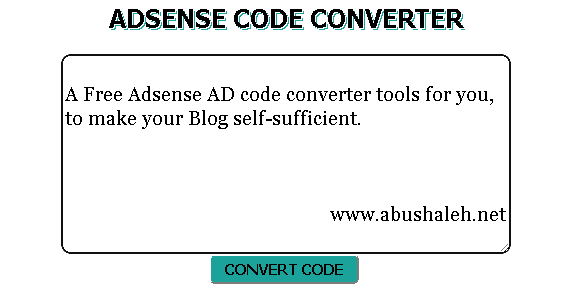
Giveaway: Adsense AD code converter Plugin for Blogger

If you want to add Adsense Ad units or any other ad scripts inside the Blogger Template or anywhere in the Blog, You can't directly Paste it in the template code. You need to first convert the code and make it Blogger Template friendly!

Adsense AD code converter script
This tool automatically converts AD codes into the correct format so you can embed it directly into your xml Blogger template. It is perfect for converting AdSense, Chitika or any other AD codes you may have.

In this post I have this tool free for you and your Blogger/blogspot Blog, to make your Blog self-sufficient. This Plugin is ~2kb created using Javascript, HTML and Embeded CSS.

Install this Plugin in your Blog

First Create a Blank Page in your Blogger Blog Than Go to HTML mood and just Paste the codes below-

<script type="text/javascript">
function convert(){var ele1=document.getElementById("somewhere");var replaced;replaced=ele1.value;replaced=replaced.replace(/</ig,"&lt;");replaced=replaced.replace(/>/ig,"&gt;");replaced=replaced.replace(/"/ig,"&quot;");replaced=replaced.replace(/&#177;/ig,"&plusmn;");replaced=replaced.replace(/&#169;/ig,"&copy;");replaced=replaced.replace(/&#174;/ig,"&reg;");replaced=replaced.replace(/howdy/ig,"ya'll");ele1.value=replaced}
</script>
<center><span style="font: Bold 25px Tahoma; margin: 0px; padding: 0px; text-shadow: 0.04em 0.04em #fff,  0.08em 0.08em #1ba29a;">ADSENSE CODE CONVERTER</span><br/>
<table border="0" cellpadding="0" cellspacing="1" style="width: 450px;"><tbody>
<tr><td><br />
<textarea id="somewhere" style="border: 2px solid #111; border-radius: 10px; height: 200px; width: 450px; outline:0; font: 12px Georgia"></textarea><br /></center><center>
<input onclick="convert();" type="button" value="CONVERT CODE" style="height: 30px; width: 150px; font: Bold 15px Tahoma; background-color: #1ba29a; border-radius: 5px;"/>
<br /></center></td></tr></tbody></table></form></center>

Save the Page and Done! Now you can convert your AD codes by going to the page easily when you want :)

Copyright

This Blogger Plugin is fully yours! I did not reserved any copyrights of this script. If you like this don't forget to thanks us, it really Helps. Smile :)

This Tool is for only converting AD codes. For Bigger Scripts use Online Code Encoder. To view this script or any other scripts DEMO or real time work use Online Code Editor.

Continue Reading »

Why Google AdSense is better for new bloggers?

If you ask some bloggers and webmasters what they think about Google AdSense, you’ll probably hear - Some love it, some think it is ok, and some hate it because they can not able to make money with it. I fall in the 2nd group.

Google Adsense
As far as monetizing your site with ads, I think AdSense is the best advertising network on the Internet. And it is really very good for new bloggers who just started and want to earn some. Why I think adsense is better for new bloggers?

Easy to Use

Most ad networks require a minimum traffic level before you can join, and the application and setup process can be a pain.

AdSense, on the other hand, can be used even on small websites, and it has very few restrictions regarding where you can use it.

Huge Advertisers

AdSense is by far the advertising network with the largest amount of advertisers. This means that you’ll get your units filled with ads pretty much every single time a visitor comes to your site.

On many other ad networks this is not true, and your earnings tend to get negatively affected.

Ads Are Targeted

Most advertising networks claim to only display ads that will match the content of your site, but few actually do it.

This is connected with the previous point. In order to be able to display targeted ads the network must have a huge collection of ads to choose from, and most networks don’t have it!

Can Monetize Global Traffic

Another problem with most ad networks is that they tend to focus on US traffic. Some will pay pennies for impressions coming from outside the US, and others will not pay at all. If 50% or more of your traffic comes from other countries, you can guess that you’ll be losing money.

It’s true that on Google AdSense you also have some advertisers targeting US traffic exclusively, but there just as many targeting visitors from other countries and parts of the world.

Earnings Are Pretty Good

I have seen ad networks that occasionally offered very high eCPMs but on average AdSense tends to beat most networks.

Ads Blend Well

Some people don’t like text links, but I think they are actually less intrusive than flashy banner ads, and it’s possible to integrate them with the design of your website without making it look ugly.

Payments on Time

Many blogger has problems trying to receive the money ad networks owed to them. Sometimes they would pay 30 or 60 days late, other times they would pay only half of the money supposed to receive.

With Google AdSense you naver have a problem in this regard. The payment is always sent directly to Your bank account at the end of every month, and the amount is always accurate.

From the Editor

What is your relationship status with Google AdSense? Do you love it? Hate it? Explain why with a comment below :)

Continue Reading »

How to increase your Adsense revenue Quickly

Google Adsense

Google AdSense is a pay-per-click (PPC) program that can give you advertising revenue from each page on your website with a minimal investment in time and no additional resources.
AdSense delivers relevant ads that are targeted to the content people find on your site.
In many advertising networks and websites, including AdSense, the advertiser is charged for advertising their ad only when a user clicks on their ad. How much they pay (for that click) is called their Cost Per Click or CPC.
Here you will find some simple and effective AdSense tips that will increase your revenue. If you haven't already joined AdSense program, you should sign up first.

Now it's time to show you some tips and tricks that will optimize your AdSense ads revenue.

Tip - 1: Find your keywords


Before serving ads on a web page, check its keyword density. A free and advanced tool for finding the most prominent keywords in a page can be found here: SEO Density Analyzer. Copy the most important keywords to a text file ([web page name]-adsense-keywords.txt).

Tip - 2: Improve your keywords


Get keyword suggestions from Overture Search Inventory and from Google AdWords Sandbox. Get new keywords that can help you improve your ad relevance. Enter the keywords from [web page name]-adsense-keywords.txt and save the suggestions to [web page name]-adsense-suggestions.txt.

Tip - 3: Keep your website focused on a theme


Use the keyword suggestions to enhance your web pages and to build theme-based content. And also try to get your keywords into the anchor text of your incoming links as much as possible. Don't forget that Google AdSense is keyword-targeted advertising: Google AdSense bases its advert topics on your websites content, this means that content-rich websites of a popular topic should attract a large amount of ads.

Tip - 4: Write a new page every day


One of the best tips is to add a new page to your web site every day. The more content you have, the more visitors you will get. Put an Adsense unit on each and every content page of your site. But where? You will find more about that from the next AdSense tips.

Tip - 5: Choose the right AdSense format


Wider formats are successful because the ads are compact, easy to read and are complementary to the content. The top three AdSense formats are:
>>336x280 large rectangle
>>300x250 medium rectangle
>>160x600 wide skyscraper
Another successful format is the 468x15 horizontal ad links, that can be placed under your navigation bar.

Tip - 6: Color tips


When creating your Google AdSense ads it is recommended to use the color scheme and style of your website so that the ads blend in well. Ads without background color and borders perfom better than ads within borders with background color.

Create a custom AdSense palette:
border color = background color of your web site
background color = background color of your web site
link color = blue, color of your links
url color = black, #999999
text color = black, #333333, color of your main contentYou can also rotate your color palette: select multiple color palettes that blend with your site to create variety.


Tip - 7: Position tips


Visitors tend to look at the big headlines to see if your page is worth reading. If you get them interested, they will read the text and look for your navigation links.
Place the AdSense ads in a prominent place around the top/left part of your page or under your headlines, where your visitors are most likely to look at.
If you have an article page with a long body of text, the bottom of that article is a good place for AdSense ads because your visitors read the text and then they want more resources.

Tip - 8: Increase the number of ads


If you have a lot of text on a page, use multiple AdSense units. You can use up to three AdSense units on a page, two AdSense search boxes and one unit of ad links.
Link units allow the user to refine what they're interested in. So if they may not be interested in specific ads on your page, they might be interested in a particular topic, and by clicking on a link unit and a link in the link unit, they'll be able to specify that they're interested in that specific topic and get a lot more options and variety on the ads that might appear.
AdSense for Search allows visitors to search Google.com or your sites (up to 3 domains). You earn money whenever they click on the ads that come up on the search results. If you click the Open search results in a new browser window checkbox in the AdSense for Search settings, you won't lose your visitors.

Tip - 9: What not to do


>>Don't click on your own ads
>>Don't ask others to click on your Google ads
>>Don't manually change AdSense code
>>Don't place Google ads on sites that include prohibited content (e.g.: adult sites)
>>Don't employ cloaking, hidden text or farm linksDon't use AdSense ads on the same page with similar ads.

Tip - 10: Optional tips:


>>Create interesting to read pages, focused on a theme.
>>Integrate AdSense in your layout.
>>Put yourself in the shoes of your visitors and experiment with the ads.

Continue Reading »