Showing posts with label How to. Show all posts

How to design a good looking user friendly Blog?

Many bloggers rush through selecting their blog design elements without much thought when they first start. But the reality is design is core to your blog's brand and readership. Blog design does not require artistic training or high level skill. It requires strategic thought, target your blog's goals and target audience before start blogging.

I hate your blog design

My simple tips is, review the blog's you read frequently to become familiar with your options. Consider which blogs you like and which elements of those blogs attract your attention. Make a list of those elements you want and those that you don't want.

Here is some of my Blog design tips that you don't have to be a skilled designer to follow.

Blog layout

This includes factors like columns, sidebar, header and footer. Use simple and common layout for your Blog this will help peoples to navigate easily.

Color scheme

Which colors do you want to use on your blog? How do they render on different types of devices? Are these colors associated with your brand? Are they consistent with your offline collateral and your retail establishments? Ask your self and find out.

Font

They are the written voice of your web site and should be consistent with your brand image and comfortable for your target audience to read. Text that is difficult to read can harm your traffic building efforts.

Font size

Remember you want your readers to be able to see your text. Therefore, if people over 40 are an important segment of your target audience, use a big, easy-to-read font or provide an option to select a larger size.

Font color

It is critical to keep font color easy-on-the-eyes. Too many colors confuse and some combinations will just turn visitors off and drive them away.

Backgrounds

What colors or images do you want to use as a background on your blog? This is the stage dressing for your site. Warm colors project a human focus while cool colors are associated with technology. But you might don't want the background to attract so much attention that it distracts from your content.

Lists and block quotes

Numbered and bulleted lists are important tools for organizing and presenting content. Block quotes identify other sources of information. Style them and spice up your contents.

RSS and Email Options

Do you offer readers these choices? If so, will they receive the full text of your blog or do they need to click through and come to your site? You should add this features in your Blog.

Social sharing features

How do you want to present social media in your blog? Do you want to encourage readers to share your content? Then you should add this features in your Blog.

Mobile presentation

With increased mobile usage, does your blog render in a readable fashion on a mobile device? If not, it is a good idea to add this, especially with the increasing usage trends.

I will continue writing about Blog design so, stay tuned. I may have missed some more Important things on Blog design. Lets discuss them in comment section. Smile :).

Continue Reading »

How you can make your Blog successful?

Starting a Blog become easy and common now, every one making a Blog with ease and writing on it. Building a Blog is not a problem but, making a 'Successful Blog' might become a problem. Today I have some tips for you to make your Blog successful. You might already know some of them, then you should apply them properly in your blog.

Success Graphic

Content

If you offer well written, original, easy to understand information, spiced up with good imagery then the chances of getting quality links, social media exposure and high spots in SERPs are bigger. Content is the King! you know.

Basic SEO

You don't have to be a SEO expert to rank your site high on Google search. Just several things to remember here:

 - Include meta title tags
 - Optimal and natural usage of keywords
 - Provide good article titles
 - Proper usage of Heading tags
 - Include sitemap
 - Use Google Webmaster Tools and Google Analytics to gain insight on what works for you and what's not
 - Always avoid duplicate contents
 * Read the Google SEO Starter Guide

Design

You want more and more visitors on your website, and you want them to stick with it more often. Except offering quality content you'll need some good looking unique design for your Blog. If you're serious about your Blog, Pay someone to design your Blog for you. It doesn't need to be very expensive, a simple, pretty enough, and unique look would be good for you.

Competitors

What ever you do, you have to be more innovative, original, have a better design, better content than your competitors. Simply try to beat the competition. Use them to learn what works for them, and what doesn’t.

Promotion

Promote your site whenever you have a chance to do it, but do not exaggerate (don't be a spammer). Also several things to remember here:

 - Use Facebook, Twitter, Google+, or any other social platform popular at the moment
 - Comment on other blogs related to your niche
 - Guest post frequently on well established blogs
 - Pay for ads if you really have to

This will certainly lead to significant exposure of your site.

Speed

Make your site load fast as much as possible. This is important from two aspects: user experience and a SEO factor. Several things to remember:

 - Use good server
 - Optimize your codes
 - Use Image sprites
 - Use tools such as Google Speed, YSlow, Web Page Test, Pingdom
 - Avoid redirects

Read in details what Google and Yahoo have to say about it.

Subscribers

Capture e-mail addresses and get people to subscribe to your Blog feed early. Two-three years from now (if you're good) you might have 50k email list and 50k RSS Subcribers. And that will become a big valuable asset. Trust me.

Monetization

It is time to gather the fruits of your labor. I'll suggest don't do it early. Wait some time until your blog get on the track. There are basically three main methods to get money out of your Blog:

 - Placing ADS (CPC, CPM, CPA, CPV). Basically you need click, page view, action or video view in order to get paid.
 - Promoting affiliate products.
 - Selling you own products (ebooks, membership websites, services - design, coding, coaching, etc).

From the Editor

The most important tip would be that you do your experiments with everything I said above and come to your own conclusions about what works for you. Smile :)

Continue Reading »

How to make your Blogger/Blogspot Blog load Faster

Fast Load Time

A web browser, just like the one you’re using now, uses HTTP requests to load a webpage. Making an HTTP request takes a bit of time, so the more you have the slower things are going to get. You might then assume that it’d be better to put your CSS and Javascript all in the same file, but then caching comes into the picture.

When you visit any page your browser makes a copy of some of the files, you probably already know this. So caching is important when you have people visiting your site multiple times. Larger files take longer to load, so if we have them stored locally (cached) your website will load faster.

Making Your Blog Load Faster


1. Less Images -
Loading less images means less HTTP request. That means faster load times! So removing images that you don’t need is your next option. Sometimes you need a lot of images though, and that’s where CSS sprites come in! To put it simply, you put all of your images that don’t repeat into one file. You can then include them in CSS like so:
background: url('images/file.png') Xpx Ypx;
width: 500px;
height: 500px;
The Xpx and Ypx are the coordinates of the image you want in the sprite file, and the width and height are the width and the height of it. So this is more lines of code, which you’d think would take longer to load, right? However, the fact that you’re loading multiple images in one file and thus making less HTTP requests will actually greatly decrease your load times.

2. Combine files -
You may notice that sometimes people use multiple Javascript and CSS files. Sometimes this is a good idea, like if you’re including one javascript file on only one page, and then another on all the pages.

Sometimes though, you’ll find you have a lot of files and scripts that are used on almost all your pages, all in different files! That’s no good! So what you should do is combine these into one, which should hopefully radically decrease load times.

3. Optimize your files -
When you make your own blog, it’s easy to add useless CSS and Javascript everywhere while working on it. This can seriously slow down your website! Removing spaces, line breaks, and things comments can also really optimize load times. You should consider having a set of files for development, and a set of files for your website

4. Better Coding -
Everytime you make a mistake in HTML your browser has to figure out what you did wrong and corrects it to the best of its ability. Less errors in your code means less correcting, so the browser can spend more time actually loading the page instead!

Useful Stuffs -

1. You might want to try out Pingdom for testing just how fast your website loads
2. If you’re using Chrome or Safari (dev tools) you can right click and select ‘Inspect Element’. Then click Audit and run it. This will give you lots of tips on how you can speed it up even more!

Continue Reading »

How to Fight With Email Spam

Email Spam
We all know how frustrating junk emails can get. They clog up our email inbox and make us waste precious time cleaning them up. To make matter worse, these spam sometimes come with viruses or worms that make your system gohaywire. But all these meant little for the conned victims who actually believed in the fraudulent content and lost their money paying for ‘ransoms’ or ‘charity causes’.

Ways to Fight with Spam

1. Do not reply to junk email
When you reply to junk email or respond to its content, you are letting the sender know that your email address is valid and also, that you are reading the junk mail, which will most likely cause you to get more junk mail.

2. Have two email addresses - private and public.
Do not use your email address on any online order form or contest or even for purchasing. You could have an alternate address which you would use for those public purposes and keep your main email address private by only giving it out to your trusted friends and business associates. Use the technique explained in Technology Educaque Vol. 3, to create a separate folder in your Inbox for your public and private email.

3. Do not use a common email address
Spammers add all common names, such as Joe, Mary, Bob, Jim, etc. to their mailing list in hopes that they can find a valid email address. A common way of writing an email address is to use a person's first name initial followed by the last name. This method makes it more difficult for the spammer to guess your email. For example, Hasan Ali could use hali@yourdomain.com or mailhasan@yourdomain.com.

4. Be selective when you sign up with an ISP or online services
Since your ISP maintains the list of your email accounts, they do not have to go too far to gather a list of email addresses. There are many cheap or free ISPs or online service companies, that will make a big profit by selling your email addresses and personal information. Make sure that the ISP you are signing up with has a physical address, not just a P.O. Box, and there is a way to reach them by phone, not just email or no way to contact them. Also the quality of their website can give you a good indication of whether they are legitimate or a scam artist company that will sell your email addresses and personal information to spammers for a profit. A local company is preferable. You can always check with the Better Business Bureau (www.bbb.com) to see if there are any complaints against that ISP or online service company.

5. Do not use your private email address on your web site
If your email address is listed on any web page, there is a good chance that your email address will be added to the spammers mailing list. Many spammers will use software that automatically visits every web site and looks for email addresses. Some people think that if they have a button that says, for example, Click Here To Email Me, the actual email address is hidden. This address is still vulnerable to spammer's software, as it will find the address in the HTML code. One good way to hide your email address on a web page is to create a form for a visitor to fill in and have the form submitted to a server-side CGI program which will send you the content of that email from the server. The spammer's software can not read a server-side CGI program.

6. Do not use your private email address on directories such as Yahoo, people finder services or when purchasing domain names
Spammers and/or their software use directories, domain registrar's database and people-search web sites to find live email addresses. This is their prime hunting ground. If you use those services, be sure to use your public email address

7. Read the privacy statement. When you are signing up for online services, read the company's privacy statement.
Most legitimate companies have a privacy statement explaining how they will handle email addresses and whether or not they will distribute your email and personal information to their partner and affiliate companies. Personally, I do not trust any online organization with my private email. I only use my public email when I sign up for any service online. Even banks and large well known companies may distribute your email address.

8. Lookout for check boxes confirming to distribute your email
When you sign up for services online, there is usually a check box that by default is checked, confirming that it is OK to distribute your email address to their affiliate companies, so they can also send you promotional email. Even if the company you are signing up with has a good privacy policy, their affiliate companies may not have your best interest in mind. Those affiliate companies may also pass on your email address to their partner companies and so on.

9. Do not try to retaliate to the spammers that are sending you junk email
Spammers are most likely sleazy people. If you are technically advanced, and find their IP address and send them an angry email message, you will get their attention and they could add you to every possible mailing list or may send you a virus.

10. Use your email program's spam fighting feature
In Outlook Express, for example, when you open a junk email, on the menu bar, click Message, then click on Block Sender, then click on Yes. Repeat this for each of your junk mail messages. This will delete all future mail coming from those spammer email.

11. Changing your email address
If you are receiving over 20 junk emails a day, it is likely that your email address is already listed or going to be added on all spammers lists. Maybe it is time for you to hange your email address. Using Comentum's Administer Email Account (explained earlier), create a new email address and notify all of your trusted friends and business associates of your new address. After notification, remove your old email addresses (do not keep your old email address untouched on Comentum's server, as this will fill up your available email storage and will lock up your account).

Continue Reading »

How to Add Facebook like in Google Search Result

Facebook Like on Google Search

This feature helps you to find out what cool things on the Web have attracted the attention of your friends, but since Google is our best search buddy, it is way cooler if you can integrate Facebook ‘Like’ button on every search results too.

There is an extension called Google +Like that allows you to ‘plug’ this tiny ‘Like’ button onto your Google search results. Google +Like is a cross-browser extension, available for Internet Explorer, Firefox and Chrome, that runs with a simple script to let you integrate the Like button on Google search.

Add Google +Like

Google +Like Install
If you are using Internet Explorer, Firefox or Chrome, head over to the Google +Like download page and click on the ‘Get Google +Like’ button.

Now if you are using Chrome, click ‘Continue’ at the bottom left of the browser to allow the download of the extension, and proceed with install.

Once completed, open Google search and search for any keyword, you will see a ‘Like’ button appear just next to your search results, and on the right sidebar, you will see athumbnail list of your friends who already liked the links.

When we do any search on Google, it’s quite hard to skip to which result would be best to look up. With this ‘Like’ integration, it adds the factor of recommendations based on previous Likes by the people you know on Facebook.

Continue Reading »

How to Keep Your Home LAN Secure

lan-security

Do you know if your home LAN is actually secure? Whether you have a wired or wireless LAN, without the proper security precautions, all of your information and data can be stolen in an instant by an anonymous hacker. Don’t let something like this happen to you by following the proper steps!

First Step, when installing your router, you need to change both your administrative login and password. This is the first vulnerability a hacker will look at. What most people don’t actually know is all routers of the same brand are given the exact same login name and password. Without changing it, the hacker can easily gain access to your network and snoop around.

The Next Step, you need to take is to upgrade your encryption. While WEP has been the standard piece of encryption for years, it is recommended that you upgrade your security to WPA2, which is much more secure. You can easily download a fix for this by simply doing a quick Google search. If you are running off of a Windows computer, Microsoft provides the fix straight from their website. Once your software has been fully updated with the new security settings, you should log back into your router’s administration panel and update the security encryption to WPA2.

Next Up, make sure to change your SSID name to something other than the default name. Most default SSID’s are simply named Belkin or Linksys and this may encourage a hacker to try and break into your network because it looks like you simply plugged in your router and never touched it again. By changing the name of the router, the hacker may stay away from your network because they will perceive that you were smart enough to add security to the network. Relating to your SSID, you should also disable the broadcast network of your router so only your devices can be connected to it. This way, no one else will see or be able to connect to it.

A Major and Important Security Step, many people forget to utilize is the router’s built-in firewall. While these are normally turned on by default, certain network settings or other security programs installed on the network may prevent the firewall from actually being enabled to function correctly. By enabling your router’s firewall at all times, you are adding on an extra layer of protection to keep you safe from any hacking attempts in the future.

As far as other settings go with your router, be sure to check that the “remote administration” option is disabled. This should automatically be disabled by default but again, it’s always good to check. This feature, if enabled, is basically inviting hackers to attack your network and steal your information. Hackers can basically access your whole home network if this option is enabled, including devices like your printer or anything else connected to the network such as a smartphone or iPad.

To minimize the leak of your wireless network outside of your home, keep the router away from the edge of your building or home. If you can, keep this router in a central area like the middle of a room. This ensures that the wireless signal will be fairly weak outside of the building. Keep in mind that wireless routers vary in terms of their signal range, so try walking around your house with your laptop to see where you can pick up a signal from. Then you can adjust accordingly.

It can be a scary event if a hacker ever breaks into your network. Your personal information can be stolen as well as any important files that you may have. By following all of the steps listed above, you can be sure that your home LAN will be extremely secure against any type of attacks and you’ll always have a tight lock on your data.

Continue Reading »

How to Fix Slow Internet Browsing


Sometimes we feel that internet browsing is slow because of the internet service provider. Frankly speaking I realized that I should write down my own experience related to this slowness. Frankly I can tell you all that the slowness of the internet browsing might not be because of the internet service provider, rather it can happen because of many other reasons too like due to the storage of the temporary files on the system and might be due to the toolbars, add-ons, and extensions loaded with your web browser.

Actually while surfing the net we don’t realize that our browsers store some temporary files on our system, which gradually increases with the more website we surf and with time. These temporary files slow down your system and internet browsing with time. Normally what I do to rectify this problem is that whenever I open the system I use to clear all the temporary files stored with my user profile. It helps me to get good speed while surfing the net.

Apart from that I use to do clear history of my browsers on a daily basis too. It helps to clear many temporary files. Actually I use to set the automatic settings which clear the history, once I close the browser. But, many a times I use to do it manually too, so that it does not leave any data on my system, which can increase the load of the system and slow down the net surfing.

Other than the above mentioned stuffs, there is one more thing which harms the internet browsing speed of your system, and it is lots of toolbars, add-ons and extensions installed with your browsers. One day I went to one cyber café for some work and I found that the top portion of the browser was loaded with too many things. Net surfing on that particular system was too bad and that experience was not at all memorable.

Frankly, these toolbars, extensions and add-ons do not only slow down your internet browsing speed, rather they are also a source of malicious attack on your system. Some of the toolbars are too week as far as security of your PC is concerned, and they unknowingly allow malicious software to creep onto your PC.

It is always a threat for your PC. Actually all these toolbars, add-ons and extensions are one kind of software’s which is not that much secure. They actually reduce the display area for web pages on your browser. Other than slowing your browsing speed they also display annoying and unsolicited information too.

Frankly speaking it is my suggestions that do not install any free toolbar offered by many websites, unless you are sure that it is safe and required for your system. Many of the toolbars are used as a hijacker too, which can hijack many important data from your system and harm you too.

Continue Reading »

How to increase your Adsense revenue Quickly

Google Adsense

Google AdSense is a pay-per-click (PPC) program that can give you advertising revenue from each page on your website with a minimal investment in time and no additional resources.
AdSense delivers relevant ads that are targeted to the content people find on your site.
In many advertising networks and websites, including AdSense, the advertiser is charged for advertising their ad only when a user clicks on their ad. How much they pay (for that click) is called their Cost Per Click or CPC.
Here you will find some simple and effective AdSense tips that will increase your revenue. If you haven't already joined AdSense program, you should sign up first.

Now it's time to show you some tips and tricks that will optimize your AdSense ads revenue.

Tip - 1: Find your keywords


Before serving ads on a web page, check its keyword density. A free and advanced tool for finding the most prominent keywords in a page can be found here: SEO Density Analyzer. Copy the most important keywords to a text file ([web page name]-adsense-keywords.txt).

Tip - 2: Improve your keywords


Get keyword suggestions from Overture Search Inventory and from Google AdWords Sandbox. Get new keywords that can help you improve your ad relevance. Enter the keywords from [web page name]-adsense-keywords.txt and save the suggestions to [web page name]-adsense-suggestions.txt.

Tip - 3: Keep your website focused on a theme


Use the keyword suggestions to enhance your web pages and to build theme-based content. And also try to get your keywords into the anchor text of your incoming links as much as possible. Don't forget that Google AdSense is keyword-targeted advertising: Google AdSense bases its advert topics on your websites content, this means that content-rich websites of a popular topic should attract a large amount of ads.

Tip - 4: Write a new page every day


One of the best tips is to add a new page to your web site every day. The more content you have, the more visitors you will get. Put an Adsense unit on each and every content page of your site. But where? You will find more about that from the next AdSense tips.

Tip - 5: Choose the right AdSense format


Wider formats are successful because the ads are compact, easy to read and are complementary to the content. The top three AdSense formats are:
>>336x280 large rectangle
>>300x250 medium rectangle
>>160x600 wide skyscraper
Another successful format is the 468x15 horizontal ad links, that can be placed under your navigation bar.

Tip - 6: Color tips


When creating your Google AdSense ads it is recommended to use the color scheme and style of your website so that the ads blend in well. Ads without background color and borders perfom better than ads within borders with background color.

Create a custom AdSense palette:
border color = background color of your web site
background color = background color of your web site
link color = blue, color of your links
url color = black, #999999
text color = black, #333333, color of your main contentYou can also rotate your color palette: select multiple color palettes that blend with your site to create variety.


Tip - 7: Position tips


Visitors tend to look at the big headlines to see if your page is worth reading. If you get them interested, they will read the text and look for your navigation links.
Place the AdSense ads in a prominent place around the top/left part of your page or under your headlines, where your visitors are most likely to look at.
If you have an article page with a long body of text, the bottom of that article is a good place for AdSense ads because your visitors read the text and then they want more resources.

Tip - 8: Increase the number of ads


If you have a lot of text on a page, use multiple AdSense units. You can use up to three AdSense units on a page, two AdSense search boxes and one unit of ad links.
Link units allow the user to refine what they're interested in. So if they may not be interested in specific ads on your page, they might be interested in a particular topic, and by clicking on a link unit and a link in the link unit, they'll be able to specify that they're interested in that specific topic and get a lot more options and variety on the ads that might appear.
AdSense for Search allows visitors to search Google.com or your sites (up to 3 domains). You earn money whenever they click on the ads that come up on the search results. If you click the Open search results in a new browser window checkbox in the AdSense for Search settings, you won't lose your visitors.

Tip - 9: What not to do


>>Don't click on your own ads
>>Don't ask others to click on your Google ads
>>Don't manually change AdSense code
>>Don't place Google ads on sites that include prohibited content (e.g.: adult sites)
>>Don't employ cloaking, hidden text or farm linksDon't use AdSense ads on the same page with similar ads.

Tip - 10: Optional tips:


>>Create interesting to read pages, focused on a theme.
>>Integrate AdSense in your layout.
>>Put yourself in the shoes of your visitors and experiment with the ads.

Continue Reading »

How To Customize Facebook Chat

Facebook Chat

In this tutorial, we will show you how to do that with Pretty Facebook Chat. Pretty Facebook Chat is a Google Chrome extension that gives mobility and flexibility to your Facebook Chat. And yes, you can use emoticons on it too.

Install Pretty Facebook Chat


Firstly, you must have the Google Chrome browser installed on your computer. If you have it installed, log in to your Facebook account, then head over to the Google Chrome Webstore and search for ‘Pretty Facebook Chat’.
Chrome Store
After the results appear, click on the ‘Add To Chrome’ button to install the extension. Installation is automatic and will only take seconds.
add to
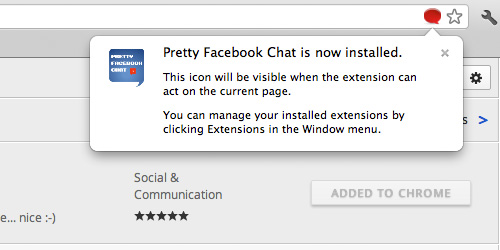
Once installed, you will see a small red icon in the address bar at the top right corner, with a notification indicating that your installation is complete.
Pretty Facebook Pop-up
Now open your Facebook Wall. If it is already open, refresh the page and you will be able to see a second red icon at a separate place, at the bottom of the browser just next to the Facebook translation icon.
Click the icon to toggle the switch to ON. Once Pretty Facebook Chat is in active mode, you can start chatting with anyone, and you will see that the chat box is no longer attached to the bottom of the browser. You can now drag it anywhere within the browser.


Emoticons, Font And Box Size


Let’s look at how you can start using emoticons and changing the font and box size.

1. Emoticons

From the chat box, there will be a smiley emoticon visible at the top right corner of the box, just mouse-hover over it and a pop-up window will appear with a selection of emoticons to choose from.

2. Font Size & Box Size

Now at the top right corner of the browser (inside the address bar) there’s another icon indicating that you have Pretty Facebook Chat installed. Click on that button to change the font and box sizes. You can control the chat box shadow too.

With Pretty Facebook Chat, you have more control over your Facebook chat box. Chatting with friends will be more fun with tons of emoticons to choose from. And let’s not forget the newly acquired mobility of the chat box, it no longer has to be stuck at the crummy corner, below eye-level.

Continue Reading »